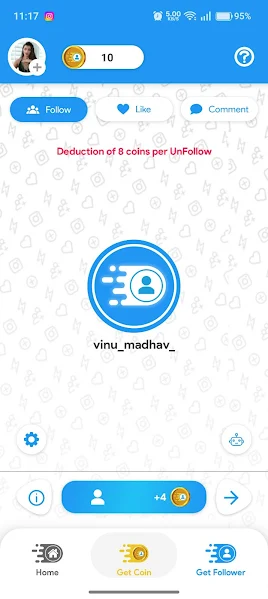
Problem 1: Mysterious Coin Drop (The 8-Coin Penalty Trap)
The Symptom: You farm 500 coins, close the app, and reopen it hours later to find your balance has shrunk to 200 coins.
The Technical Cause: Look closely at the screenshot above. Niva Follower displays a permanent red alert: "Deduction of 8 coins per UnFollow." When you earn +4 coins by following a profile, the server records that transaction ID. If you later unfollow that account from the native Instagram app or another tool, Niva Follower's backend audit loop penalizes your account by docking 8 coins per unfollow.
HOW TO FIX IT:
Never manually unfollow accounts on your burner profile while using Niva Follower. If your burner’s followed list becomes cluttered (reaching Instagram’s 7,500 limit), simply retire that burner and create a fresh secondary account instead of mass unfollowing.
Problem 2: "Challenge Required" Checkpoint Loop on Login
The Symptom: Tapping "Sign in with Instagram" results in an endless loading spinner or a red banner stating "Challenge Required".
The Technical Cause: Instagram detected an automated login attempt from an emulator or mobile IP differing from your habitual location, locking the session until you prove human ownership.
THE 4-STEP RECOVERY PROTOCOL:
1. Force stop Niva Follower in Android Settings.
2. Open Google Chrome on your smartphone and navigate to https://instagram.com.
3. Log into the burner account. Instagram will display the security checkpoint (SMS code, email PIN, or "This was me" prompt). Complete it.
4. Crucial: Wait 15 minutes before opening Niva Follower. Then re-enter your credentials. The login will pass instantly.
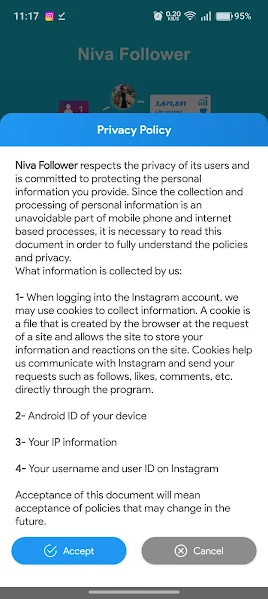
Device Fingerprinting in Privacy Modal
Problem 3: Coin Counter Freezes (+4 Coins Not Incrementing)
The Symptom: The auto-follow robot runs, profiles flash on screen, but the coin balance remains stuck at the same number.
The Technical Cause: Your burner account hit Instagram’s hourly velocity limit (typically 50-60 actions per hour). The Instagram API returned HTTP status 429 Too Many Requests or 400 Feedback_Required. Niva Follower silently pauses coin accumulation to avoid getting the account banned.
The Fix: Tap the robot icon to pause the bot. In the app’s Settings (gear icon), slide the sleep delay interval to 6 to 10 seconds. Allow the account to rest for at least 90 minutes before resuming tasks.
Problem 4: Server Timeout (Unable to Reach followland-app.ir)
The Symptom: The app displays "Network connection error" or hangs indefinitely on the splash screen.
The Technical Cause: The official developer host (followland-app.ir) is registered on an Iranian top-level domain. Certain regional ISPs in South Asia or Europe apply automated DNS blocks to foreign TLDs.
The Fix: Open Android Settings → Network & Internet → Private DNS. Set the hostname to 1dot1dot1dot1.cloudflare-dns.com or dns.google. This bypasses ISP-level DNS filtering and establishes an instant encrypted connection to the task servers.
Problem 5: "Parse Error" During Installation
The Symptom: Android displays "There was a problem parsing the package."
The Fix: This indicates an incomplete download or an incompatible Android build. Download the verified, uncorrupted binary directly from our mirror below:
Frequently Asked Questions
Niva Follower enforces an active penalty rule: "Deduction of 8 coins per UnFollow." If your burner account unfollows profiles you previously followed, the server audits your account and deducts 8 coins per unfollowed user.
Force-stop Niva Follower, open Google Chrome on your device, log into the burner account on instagram.com, complete the verification captcha, wait 15 minutes, then re-open Niva Follower.
Some ISPs block the app’s backend domain (followland-app.ir). Set your Android Private DNS to 1dot1dot1dot1.cloudflare-dns.com or dns.google to bypass regional DNS filtering.