
Experiencing upcoming features and updates for Free Fire does not require exposing your device to malicious software or risking a permanent account ban. Several safe, official, and highly informative alternatives to the Astute Beta Server are available. These range from Garena's official cloud-based staging builds to content creator programs and datamining analyses. This guide details how you can stay updated on new content safely.
1. The Official Garena Advance Server Staging Program
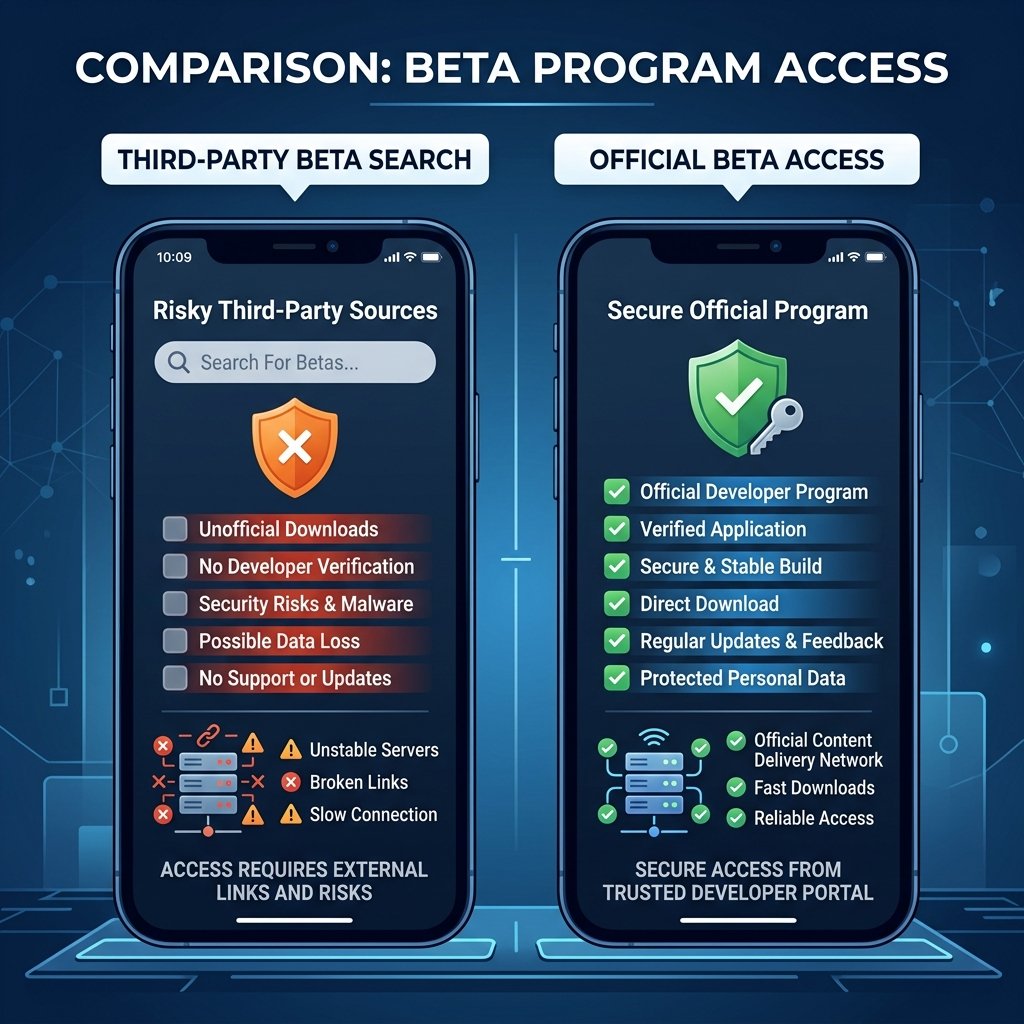
The most reliable alternative to any unofficial client is Garena’s official testing program: the Free Fire Advance Server. This program operates as a secure staging server. It is run directly by Garena’s engineers and uses a dedicated database cluster that is completely isolated from live production databases.
When you test a beta build on the official Advance Server, you use a temporary guest profile. This keeps your live game profile, rankings, weapon skins, and diamond balances completely safe and unaffected by any bugs or crashes that occur during testing.
Official Early-Access Architectures in Modern Gaming
To understand why official staging environments are far superior to third-party modified servers, we must look at the backend architectures deployed by top-tier gaming studios:
- Minecraft Snapshots (Mojang/Microsoft): Minecraft releases weekly Snapshots directly integrated into the native Minecraft Launcher. Under the hood, this launcher reads from a dynamic JSON manifest file provided by Mojang’s content distribution network (CDN). When a player selects a snapshot, the launcher pulls the jar file from dedicated, version-specific Amazon S3 buckets. In Minecraft's architecture, single-player mode executes a local server thread that runs the snapshot jar client-side, while multiplayer testing uses standalone server jars with specific feature flags enabled. This architecture ensures sandboxed gameplay, allowing developers to test unstable blocks, world generation updates, and mob AI routines without corrupting existing long-term survival worlds or exposing players to malicious code.
- League of Legends Public Beta Environment (LoL PBE - Riot Games): The PBE is a dedicated, geodistributed server region completely isolated from the standard live shards (such as NA, EUW, or EUNE). Riot Games hosts the PBE on separate hardware infrastructure with dedicated login queue servers and decoupled database instances. Player accounts must be manually linked and replicated to the PBE database. This decoupled replication maintains a one-way synchronization scheme: changes made to accounts on the PBE (such as unlocked champions, test skins, or Blue Essence balances) never propagate back to the live database, keeping the primary account secure. Crucially, the PBE client has its own dedicated patch delivery CDN, letting Riot deploy daily balances and experimental netcode updates to a subset of players.
- PlayerUnknown's Battlegrounds Test Server (PUBG - PUBG Corporation): Operating as a separate application listing on Steam, the PUBG Test Server requires a full, independent client installation (often exceeding 40 gigabytes). It relies on dedicated matchmaker servers and independent backend API clusters. By routing test traffic to this secondary infrastructure, developers can measure server tick-rate degradation, test network physics under load, and monitor weapon-balance variables in real-time. Because of this complete separation, game crashes or server-side memory leaks on the test server have zero impact on the matchmaking queues or rank databases of the live game.
The Architectural Shortcomings of Third-Party Modded Servers
In stark contrast to these multi-million dollar official architectures, third-party modded servers (such as those claiming to connect to the "Astute Beta Server") are highly unstable, unofficial projects created by hobbyists or malicious actors. These modded projects lack access to Garena's proprietary backend source code, server-side configurations, and database infrastructure.
- Reverse-Engineered Stub Servers: Modded servers run on lightweight, custom-written server frameworks (often built with Node.js, Python, or Go) that mimic Garena’s network endpoints. Because they do not have the real game logic, they use "stubs"—hardcoded mock responses that simulate authentication, inventory queries, and lobby configurations. When a client tries to enter a real matchmaking queue, the modded server fails to simulate the complex physics, bullet registration, and anti-cheat checks of the actual game engine, resulting in lobby loops, empty maps, or instant crashes.
-
APKs with Patched Endpoints: To make a client connect to a third-party server, creators must decompile Garena's original APK, modify the destination IP addresses or domain names in the compiled binary files (such as
libil2cpp.soor configuration manifests), and recompile it. This process breaks the cryptographic signature of the original app, meaning the modified APK cannot receive official updates, cannot connect to Google Play Services, and is instantly flagged by Garena's automated anti-cheat systems, resulting in immediate device bans. - Severe Security Risks: Unlike official CDNs, third-party mod APKs are distributed via unsecured file-sharing sites (like MediaFire or Mega) and lack any security oversight. Malicious developers frequently inject Trojan horses, keyloggers, and advertisement overlays directly into the patched binaries, allowing them to steal personal information, access SMS verification codes, or hijack social media accounts linked on the device.
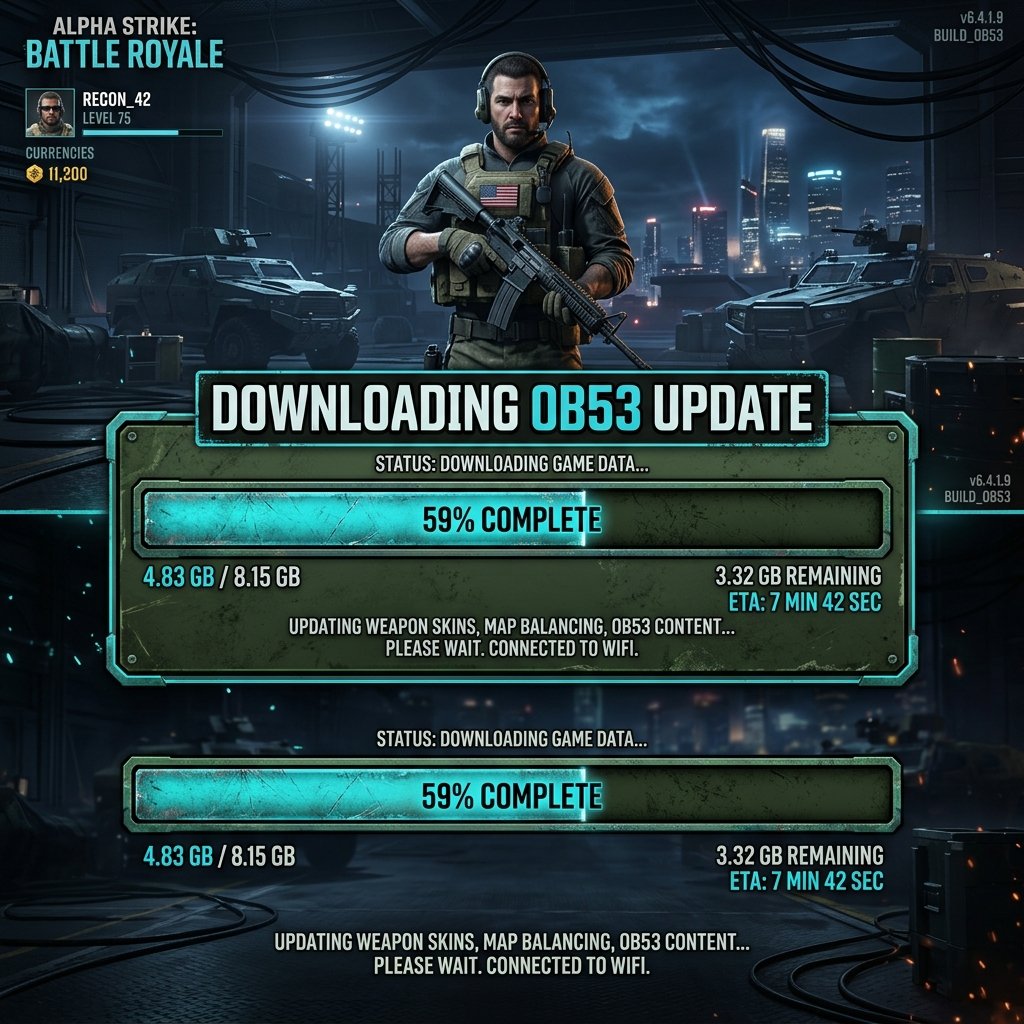
Additionally, Garena actively rewards players who participate in this program. Through the Bug Bounty Program, players who identify and submit valid bug reports receive real diamonds sent directly to their live global accounts.
A valid bug report requires submitting details such as screenshots, system crash logs, and step-by-step instructions to reproduce the issue. This program offers a real reward for testing, which no unofficial beta server can provide.
2. Cryptographic APK Verification & Sandboxed Scanning
If you must download application files from outside the official Google Play Store, you should run a security audit first. You can verify the safety of any file using cryptographic checks and dynamic sandboxing tools.
Every application package has a unique cryptographic hash (such as a SHA-256 string). This hash functions as a digital fingerprint. If a modder changes even a single line of code in the APK, the resulting SHA-256 hash changes completely. By checking this hash, you can verify if a file has been tampered with.
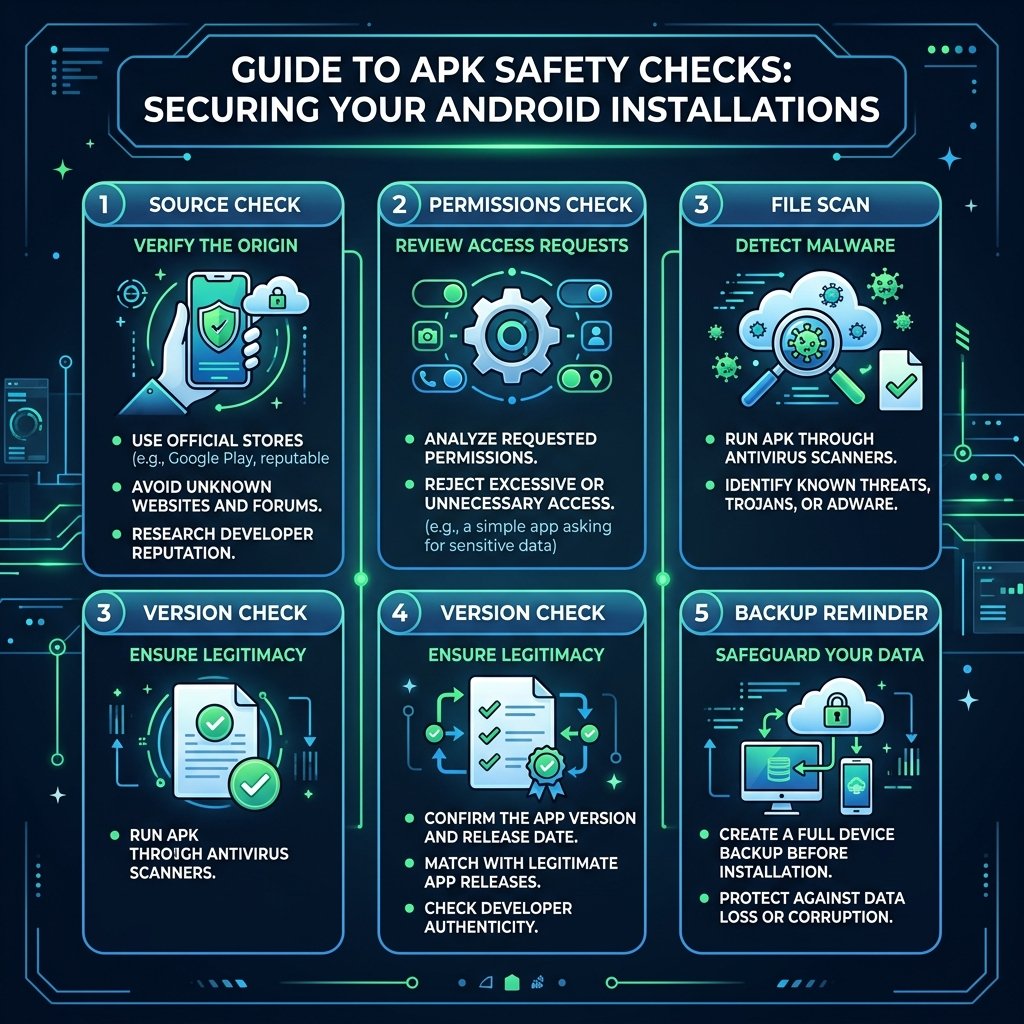
Before installing any APK, follow these verification steps:
- Run Security Scans: Upload the APK file to VirusTotal.com. This platform scans the file across 70+ antivirus engines to detect trojans, keyloggers, and adware signatures.
- Check requested permissions: Verify the application's manifest file (
AndroidManifest.xml). If a beta game client requests access to sensitive APIs (such as reading SMS messages, contacts, or camera feeds), block the installation. - Utilize Virtual Sandboxes: Run the APK within a virtual sandboxed environment, such as a secondary testing device or an Android emulator. This prevents the application from accessing your primary personal accounts and data directories.
Securely Configuring Virtual Emulators for Testing
When testing unverified beta clients or modified APK files, using an emulator is not enough on its own. If the emulator is running with default configurations, a malicious application can still scan your local area network (LAN), target other connected smart home devices, access local shared network drives, or read system-level host details. To prevent this, you must configure a secure, isolated sandbox for the emulator.
1. Isolating Virtual Interfaces (VLANs and Host-Only Networks)
By default, emulators (like BlueStacks, LDPlayer, or Genymotion) use a Network Address Translation (NAT) bridge to share the host computer's network interface. In this mode, the emulated Android system resides in a virtual subnet (e.g., 10.0.2.0/24) but can freely route packets to your physical local network (e.g., 192.168.1.0/24). To isolate this:
-
Configure Host-Only Adapters: In your hypervisor configuration (such as Oracle VM VirtualBox, which underlies several popular emulators), disable the NAT adapter and enable a Host-Only adapter (e.g.,
vboxnet0). This restricts all network communication to a private channel between the host operating system and the guest virtual machine, blocking the emulator from accessing external physical devices on your LAN. - VLAN Tagging: If you require the emulator to have internet access to download patch files but still want complete LAN isolation, set up virtual network interface card (VNIC) bridging associated with a specific Virtual Local Area Network (VLAN). In hypervisor settings, bind the emulator's network interface to a tagged VLAN ID (e.g., VLAN 99). Configure your physical router or virtual switch to drop all traffic between VLAN 99 and your primary home subnet (VLAN 1) while permitting outbound WAN routing.
2. Firewalling Emulated IP Subnets
To enforce this network boundary, you must write host-level firewall rules. If using Windows Defender Firewall or Linux iptables, you can block the emulated subnet from traversing into private address ranges:
-
Windows PowerShell Firewall Rule:
New-NetFirewallRule -DisplayName "Block Emulator LAN Access" ` -Direction Outbound ` -LocalAddress "192.168.56.0/24" ` -RemoteAddress "192.168.1.0/24", "10.0.0.0/8", "172.16.0.0/12" ` -Action Block ` -Protocol Any -
Linux iptables Rule:
sudo iptables -A FORWARD -s 192.168.56.0/24 -d 192.168.0.0/16 -j DROP
These rules ensure that even if a modded APK contains network-scanning payloads, it cannot communicate with your home storage servers, backup drives, printers, or other computers on your home network.
3. Mock Location Spoofing via ADB (Android Debug Bridge)
Many beta clients attempt to verify your country or region by querying the device's location services. To prevent the app from reading your true GPS coordinates, you must configure mock locations securely using ADB.
-
Enable Mock Location Developer Settings: You must first grant mock location permission to a specific routing or spoofing application. Run the following ADB shell command from your host machine:
adb shell appops set com.secure.mocklocationapp android:mock_location allow -
Injecting Telemetry Coordinates via ADB: Instead of installing a third-party GPS spoofing app (which itself could contain adware), you can send coordinates directly to the Android emulator system telemetry engine. Connect to the emulator port and send a simulated location fix:
adb emu geo fix -122.084095 37.422005 - Disabling Access to Network-Based Location: Within the Android emulator's settings menu, change the Location Mode to "Device Only" (GPS-based). This disables network-based location triangulation, which looks at Wi-Fi SSIDs and cell towers, preventing the beta client from guessing your physical location through network metadata.
3. Garena Content Partner Program & Verified Creators
If you cannot register for the official Advance Server due to limited registration spots, the next safest alternative is to follow Garena's verified partner channels.
Garena runs a structured Partner Program that grants early access to professional content creators and streamers. Partners receive verified testing builds and login tokens directly from Garena's development team.
Following these creators provides several advantages:
Expert Gameplay Reviews
Partnered creators record high-definition gameplay of upcoming character abilities, weapon adjustments, and map changes. They provide expert analysis of how these changes will affect competitive gameplay styles.
Zero Security Risk
By watching verified videos instead of downloading unverified files, you avoid the risk of device infections, account bans, or profile suspensions. This is the only reliable way for iOS users to preview upcoming updates.
Official Verification Channels: Preventing Early Access Scams
Fake beta portals, phishing sites, and unofficial mod downloaders often steal Garena's official logos, layouts, and character artwork to trick users. To verify whether a source is legitimate, you must check its technical and digital signatures.
1. Domain Signatures and SSL Certificate Validation
Every legitimate Garena service uses a subdomain of their primary domains: garena.com or sea.com. When visiting any early-access portal, check the address bar:
-
Analyze the Domain Name Structure: Phishing sites use typo-squatting domains like
garena-freefire-beta.com,ff-advanceserver-garena.net, orfreefire-registration.org. Official portals are hosted on specific subdomains such asff-advance.ff.garena.com. The text preceding the first single slash/must end exactly with.garena.comor.garena.independing on the region. -
Check Certificate Authority (CA) Credentials: Click the padlock icon in your browser to inspect the SSL certificate details. Phishing websites use free Domain Validated (DV) certificates from Let's Encrypt, ZeroSSL, or Cloudflare, which only verify that the domain exists. Official Garena portals use Organization Validation (OV) or Extended Validation (EV) certificates. Under the certificate details, check the "Subject" field. It should display Garena's official corporate identity, such as:
If this organization field is blank, the website is not an officially verified corporate portal.Subject: C=SG, O=Garena Online Private Limited, CN=*.garena.com
2. Garena DNS Records Verification
If you receive an invitation link via email or want to verify if an IP address belongs to Garena’s server infrastructure, you can check Garena’s DNS configurations using command-line query tools.
-
Querying Name Servers: Official Garena domains point to Garena’s proprietary DNS servers. Run a query for the name servers:
Expected output includes official servers likenslookup -type=ns garena.comns1.garena.com,ns2.garena.com,ns3.garena.com, andns4.garena.com. -
Verifying SPF, DKIM, and DMARC Records: Scam campaigns often send emails claiming to offer beta activation keys. You can verify if the email sender domain is authorized to send emails on behalf of Garena by checking the Sender Policy Framework (SPF) records:
The official SPF TXT record defines the allowed IP subnets that are allowed to send emails for that domain (e.g.,nslookup -type=txt garena.comv=spf1 ip4:203.116.116.0/24 include:mail.garena.com -all). If the sending domain has no SPF record or points to an unrelated server, the email is spoofed.
3. Social Media Verification Badges
Before clicking any download or registration link found on social media (such as YouTube, TikTok, or Instagram), look for the official platform verification badge (the blue checkmark).
Do not rely on the badge alone, as some platforms allow users to buy verification checkmarks. Instead, verify that the social media account links back to the official domain https://www.garena.com or https://ff.garena.com in its bio, and that the account username matches Garena's official regional handles (such as @freefireofficial or @garenafreefire).
4. Community Wikis & Datamining Meta Analysis
Another source of early update information comes from Datamining. Dataminers inspect compiled game updates using asset extraction tools (such as AssetStudio or Unity Asset Bundle Extractor).
These tools allow users to read game asset archives and identify unreleased assets, including textures, audio files, 3D models, and configuration files, which are hidden within the game’s directories.
Dataminers compile their findings into structured lists on community wikis, subreddits (such as r/freefire), and official developer Discord servers.
These community platforms compile leak lists, patch note summaries, and translation guides. Participating in these channels allows you to review upcoming features without downloading unverified files to your device.
The Architecture of Local-Only Mock Servers
For players who wish to explore local client assets or test customized interfaces in a safe, offline environment, security researchers and developers sometimes set up local mock servers. This architecture routes the game client's connections back to their own computer, removing the need to connect to Garena's production databases.
1. Local Network Redirection (Loopback Routing)
To direct the game client to a local testing server instead of Garena's official servers, you must intercept the client's network requests. This is done using loopback routing:
-
Editing the System Hosts File: On a rooted Android emulator or testing device, developers modify the local DNS resolution file
/system/etc/hosts. By adding an entry, any network connection to Garena's API servers is redirected to the local machine:127.0.0.1 ff.api.garena.com 127.0.0.1 login.ff.garena.com -
Using Mitmproxy or Charles Proxy: If the device is not rooted, you can route the emulator’s traffic through a local proxy running on the host computer. The proxy intercepts outbound HTTP/HTTPS requests, decrypts them using a custom root CA certificate installed in the Android User or System Certificate Store, and redirects specified endpoints to a local development port (e.g.,
http://localhost:8080).
2. Mocking REST APIs (Node.js Express Implementation)
A local mock server is a simple API service that returns the JSON configurations that the game client expects to receive during startup. Here is an example of a mock server script written in Node.js using Express to handle login requests and return a mock user profile:
const express = require('express');
const app = express();
app.use(express.json());

// Mock Login Authentication Endpoint
app.post('/api/v1/login', (req, res) => {
    console.log(`Received login attempt for UID: ${req.body.uid}`);
    res.status(200).json({
        status: "success",
        token: "mock_session_token_998877",
        expire_time: 2524608000,
        server_region: "LOCAL_TEST"
    });
});

// Mock User Profile and Inventory Endpoint
app.get('/api/v1/user/profile', (req, res) => {
    res.status(200).json({
        uid: "99999999",
        nickname: "LocalTester",
        level: 80,
        exp: 1200000,
        diamonds: 999999,
        gold: 999999,
        inventory: [
            { item_id: 1001, name: "Premium Bundle", count: 1 },
            { item_id: 2002, name: "Evo Gun Skin", count: 1 }
        ]
    });
});

app.listen(8080, () => {
    console.log('Local Mock Server running on port 8080');
});
This mock server returns the simulated JSON payload, letting the offline client pass the startup checks and load the lobby screen without connecting to a live, official database.
3. Packet Spoofing and Socket Routing (TCP/UDP Protocol Integration)
While HTTP REST APIs handle the initial configuration, the actual gameplay, movement, and lobby matches run on custom binary socket protocols over TCP or UDP.
- Packet Dissection: Developers use network analyzers like Wireshark to capture packet streams. Since these packets are packed using Google Protocol Buffers (Protobuf) or custom serialization structures, they have a header specifying the packet length, magic bytes, and an operation code (Opcode).
- Socket Spoofing: To simulate matchmaking or lobby interactions, the local mock server runs a TCP socket listener. When the client sends an Opcode requesting to enter the lobby, the socket server replies with a spoofed packet containing dummy player slots:
import socket
import struct

# Simple Python socket mock for packet spoofing
server = socket.socket(socket.AF_INET, socket.SOCK_STREAM)
server.bind(('127.0.0.1', 9000))
server.listen(1)

print("Socket mock server listening on port 9000...")
while True:
    conn, addr = server.accept()
    data = conn.recv(1024)
    if data:
        # Extract Opcode from header (e.g., first 2 bytes)
        opcode = struct.unpack('!H', data[0:2])[0]
        print(f"Received packet with Opcode: {opcode}")

        if opcode == 1005:  # Request Enter Lobby
            # Craft a spoofed response packet
            # Header: Opcode 2005 (Lobby Response), Length 4 bytes
            response_payload = b'{"status":"joined_lobby","lobby_id":12345}'
            header = struct.pack('!HI', 2005, len(response_payload))
            conn.sendall(header + response_payload)
    conn.close()
Using this architecture, researchers can safely run local gameplay builds offline to inspect maps and UI designs without risking their live profiles.
5. Comparison of Safe Alternatives
This table compares the security, availability, and features of each safe testing alternative:
| Metric | Garena Advance Server | Verified Creators | Community Wikis / Datamines |
|---|---|---|---|
| Legitimacy | Official (Developed by Garena) | Official (Partner channels) | Informational (Player community) |
| Security Risk | 0% (Sanctioned environment) | 0% (No file downloads required) | 0% (Reading text and logs only) |
| Account Ban Risk | None (Uses temporary guest profiles) | None | None |
| Rewards | Real diamonds for bug reports | None | None |
| iOS Access | No (Android-only staging) | Yes (Accessible via web streams) | Yes (Web directories) |
| User Interface | Hands-on gameplay testing | Video gameplay demonstrations | Text, images, and model renders |
To help you choose the right path, evaluate these alternatives based on your technical comfort level:
- Garena Advance Server: Best for players who want hands-on gameplay experience with upcoming features, characters, and maps, and who want to earn rewards by reporting bugs.
- Verified Content Creators: Best for players on iOS devices or those who did not get an Advance Server activation code. This option has zero setup time and zero security risk.
- Community Wikis and Datamining: Best for advanced users who want to analyze exact stats, weapon balancing charts, and raw game database values without running any game code.
- Local Mock Servers: Best for software developers and cybersecurity researchers who want to study game network protocols and inspect assets in a fully isolated, offline environment.
6. Safe Alternatives Verdict
Protecting your device's security and your gaming accounts should always be your top priority. Third-party applications like the Astute Beta Server rely on false promises to trick players into downloading unsafe software.
Choose official channels like the Garena Advance Server, follow verified partner creators, and participate in community wikis to stay updated on new content safely and securely.